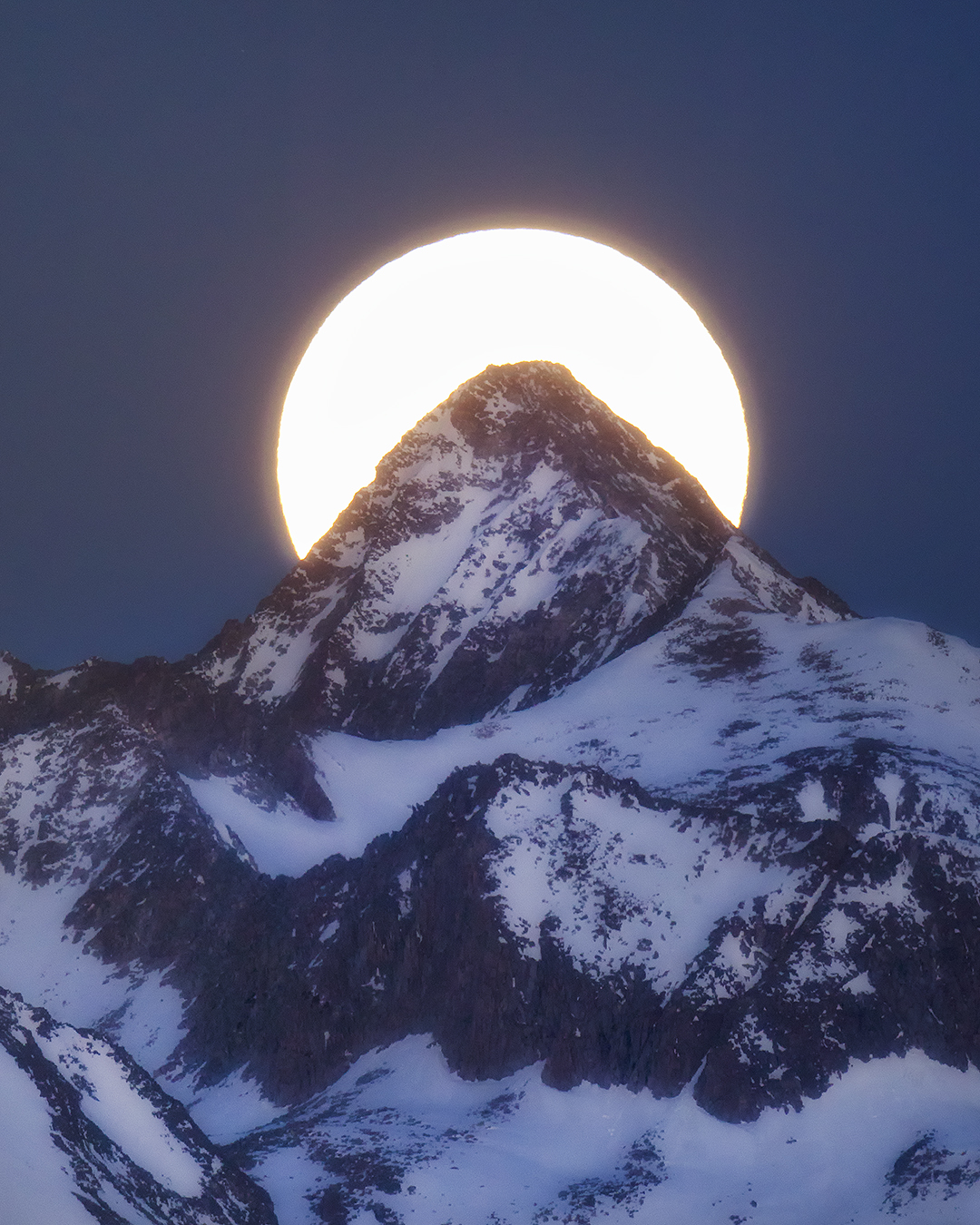
In the field, alignment is everything. If you are trying to place the moon over a mountain ridge, line up sunrise behind a lighthouse, or time the sun against a skyline edge, the shot usually comes down to one thing: where you stand and when the alignment happens.
This planner helps you find the dates and times when the Sun or Moon matches the bearing of your chosen landmark, so you can plan your shooting position, evaluate horizon clearance, and arrive with a stronger field strategy before the moment unfolds.
What this tool helps you do:
Find alignment dates for the Sun or Moon
Match azimuth to a ridge line, lighthouse, skyline, peak, or horizon target
Plan from the place you will stand. Match the Sun or Moon to your landmark’s direction, choose the time zone of your shooting location, and set a minimum height above the horizon.
Direction and visibility are different checks. A bearing match does not confirm that the full Sun or Moon clears a ridge, building, or treeline.
Planner setup is not complete. Calculations remain disabled until the matching calculation script is installed.
How to Use the Tool
Start with a specific field question: when will the Sun or Moon pass through the bearing of my chosen landmark from the place where I will stand?
Use the planner to find modeled alignment windows, review the height and timing, and save a field plan. A directional match is a starting point for scouting, not a guarantee that the composition or visibility will work.
1. Choose the Body & Your Position
Select Sun or Moon. Enter the latitude and longitude of your shooting position, not the landmark. South latitudes and west longitudes use negative numbers.
Use My Location fills your current device coordinates. For a trip elsewhere, enter the destination coordinates manually. Add site elevation in meters above sea level when known; a blank elevation uses 0 meters.
2. Confirm the Destination Time Zone
Enter the time zone of the shooting location, such as America/New_York. Coordinates do not select the time zone automatically.
Use My Device Time Zone copies your device setting, which may differ from your destination. Confirm the zone before choosing dates or reading results.
3. Set True Bearing & Tolerance
Enter the direction from your shooting position to the landmark in degrees true: 0°/360° north, 90° east, 180° south, and 270° west. Correct a magnetic compass reading for local magnetic declination before using it.
Start with ±1° tolerance, then adjust within the allowed ±0.1° to ±10° range. Tolerance controls the permitted directional difference; it does not change the engine’s underlying accuracy.
4. Set Minimum Altitude & Refraction
Minimum Altitude / Horizon Height is an angle in degrees above the level horizon. It is different from site elevation in meters. The cutoff applies to the center of the Sun or Moon, not its lower edge or full disk.
Use a ridge or skyline angle only as a deliberately entered estimate or measurement; the planner does not map terrain. Choose standard atmospheric refraction or no refraction. The standard setting models an atmosphere, not your measured local weather.
5. Search Your Selected Dates
Choose a start date and 1 to 60 calendar days. Dates follow the shooting-location time zone. Begin with a short search while checking your inputs.
Select Find Alignments and wait for the completed result. Stop Search cancels the search without saving a partial field plan. No windows found means none were found for those settings, not that every possible alignment has been ruled out.
6. Review & Save Your Field Plan
Review each window, its closest bearing match, and the returned altitude. Open Calculation Record & Assumptions to check the location, dates, time zone, settings, and declared engine version.
Use Copy Field Plan or Save Field Plan (.txt) to keep the result with its calculation record. After changing any input, run a new search and export the updated plan.
How to Read an Alignment Result
Alignment window: the modeled time span that meets your bearing tolerance and minimum center-altitude setting. A window cut off by the requested search range is identified in the result.
Closest bearing match: the smallest directional difference found within that window. It is not necessarily a sunrise, moonrise, or ideal composition. AM and PM grouping uses this time in the shooting-location time zone; each displayed time also includes its UTC offset.
Rising or setting: describes whether the calculated altitude is increasing or decreasing around the closest-match time. It does not identify a horizon-crossing event. A result labeled “setting” can still be high above the horizon.
Altitude and light context: the selected body’s center altitude follows your refraction setting. The separate Sun center altitude is shown without refraction. Moon illumination is additional context, not a prediction of clear skies or visibility.
A bearing match is not a finished composition. The altitude cutoff is a minimum, not a requested vertical position above your landmark. A match can be well above the intended subject. Terrain, full-disk clearance, horizon dip, weather, access, and visibility are not assessed automatically.
Displayed seconds describe numerical timing, not guaranteed field accuracy. Numerical searches can miss grazing or exceptional cases. Scout the sightline and independently verify important plans. This is a planning aid, not a navigation or solar-viewing safety tool.
In practical field terms, azimuth is the horizontal direction from your shooting position to the Sun or Moon. This planner measures it clockwise from true north: 0°/360° north, 90° east, 180° south, and 270° west.
If your landmark lies at 92° true, the planner searches for times when the center of the Sun or Moon falls within your chosen tolerance of that bearing. Your shooting position, the bearing to the landmark, and the time all belong to the same field plan.
What Azimuth Controls
Azimuth describes the horizontal directional match between the Sun or Moon and your landmark. It is the bearing check used to identify a possible alignment from the place where you will stand.
Your tolerance sets the permitted bearing difference. A smaller tolerance asks for a closer directional match; it does not improve the engine’s accuracy or remove uncertainty in your position or landmark bearing.
What Azimuth Does Not Control
A bearing match does not place the Sun or Moon at a particular height above your landmark. The body can share the correct direction while sitting too low, too high, or behind an obstruction for the composition you have in mind.
The planner applies your entered minimum altitude to the body’s center. It does not automatically measure a ridge, test full-disk clearance, or choose the vertical gap above a peak.
Think of It This Way
Azimuth is direction. Altitude is an angle above the level horizon. Site elevation is a height above sea level. The first two are measured in degrees; the site-elevation input uses meters. They are different quantities, not interchangeable settings.
The Minimum Altitude / Horizon Height input is a single cutoff. It compares the Sun or Moon’s center altitude, using your chosen refraction setting, against the value you enter. It is not an automatic terrain profile or a request to hold the body at that exact height.
Use the returned altitude to evaluate your intended composition, then scout the actual sightline. Changing where you stand can change the bearing to the landmark; update the position and bearing and run a new search rather than relying on the old plan.
A Simple Field Example
Illustrative settings only — not a calculated Sun or Moon event.
Suppose you enter a landmark bearing of 92° true, a tolerance of ±1°, and a minimum center altitude of 5°. The requested bearing band is 91° to 93°, and the center-altitude cutoff is 5°.
A modeled position at 92° azimuth and 20° altitude can satisfy those settings. That does not mean the body will sit immediately above a 5° ridgeline. The minimum-altitude test allows higher positions too.
Field takeaway: use the bearing match to find a candidate window, the returned altitude to judge the vertical position, and scouting to check clearance and visibility. A qualifying window is not a guarantee of the finished image.
Sun vs Moon Alignment Planning
The geometric question is the same for both: when does the body match your landmark’s true bearing while meeting your minimum center-altitude setting? The photographic decisions differ because seasonal sunlight, lunar phase, and the light on your subject matter as well as direction.
Choose the body for the image you want to make, then evaluate the returned window rather than assuming one is always easier, rarer, or more precise.
Sun Alignment
Plan around seasonal light. The Sun’s apparent path changes through the year. Search the dates for your chosen position and bearing instead of carrying an old alignment time into a different season.
Choose the visual purpose. For a silhouette, ridge, or skyline, check where you need the Sun in the composition and how you want the surrounding scene to look. Timing a bearing match alone does not choose your exposure or ensure the desired light.
Read altitude as well as time. A valid result can occur high in the daytime sky. This search is not restricted to sunrise or sunset, and its closest-match time is not automatically either event.
Plan around phase and timing. The Moon’s visible shape and its rise and set times change across its phase cycle. A lunar alignment can occur during daylight; a Moon search is not automatically a night-photography plan.
Check the light on the landscape. Decide whether you want a daylight scene, a twilight balance, or a darker foreground. Review the separate Sun-altitude value beside the Moon result, then check conditions for the intended shoot.
Treat illumination as context. The reported percentage describes the illuminated fraction of the lunar disk from an Earth-centered perspective. The percentage alone does not identify waxing versus waning, set your exposure, or predict visibility.
Compare usable windows, not just Sun versus Moon. For each result, check the modeled duration, altitude, shooting-location time zone, and intended framing. A broad bearing match is a different task from placing a disk immediately above a narrow summit.
The light values are not extra search filters. This version searches by the selected body’s bearing and minimum center altitude. It reports Sun altitude and Moon illumination at the closest match, but does not restrict results to a chosen lunar phase, twilight period, or weather condition.
Keep the plan tied to its settings. Save the calculation record with the result, rerun the search after changing inputs, and scout your actual sightline. Neither body is automatically the more forgiving choice for every landmark or composition.
Field takeaway: choose the image first, use the planner to narrow the geometry and timing, then review light, framing, access, and visibility separately. The Golden Hour & Moon Phase Planner is a companion planning resource, not a light or phase filter applied to this search.
Solar Viewing & Camera Safety
Never look at the bright Sun through an optical camera viewfinder, binoculars, or a telescope without an appropriate solar filter secured over the front of the optics. Eclipse glasses are not a substitute for that filter and must not be used to look through unfiltered optics.
Seek expert guidance on solar filters and follow your equipment maker’s instructions before attempting direct solar viewing or imaging. This planner does not determine whether a viewing or camera setup is safe.
The planner returns modeled alignment windows for the position, bearing, dates, and altitude cutoff you enter. Turning a result into a photograph still requires the right position, a workable time window, and a clear sightline.
Treat the result as a plan to check in the field, not confirmation that the location is accessible or the Sun or Moon will appear exactly where you want it in the frame.
Position
Enter the coordinates of the place where your camera will stand, not the landmark. Check the landmark’s true bearing from that position.
After moving to a different shooting position, update the coordinates, recheck the bearing and horizon angle, and run a new search. Do not assume a saved plan still applies unchanged.
Timing
Read the window’s start, end, and closest-match time together. All use the shooting-location time zone and include a UTC offset. Arrive before the window so you have time to prepare.
Check your watch or camera clock against the stated time zone. Displayed seconds describe numerical timing, not guaranteed field accuracy. Keep the exported plan available for reference.
Visibility
Check the actual sightline for terrain, trees, buildings, and other obstructions. A center-altitude result above your entered cutoff does not confirm full-disk clearance.
The planner does not check weather, haze, visibility, or access. Verify those separately before relying on a modeled window for a shoot.
Why Horizon Height Matters
Minimum Altitude / Horizon Height is a manually entered angle in degrees above the level horizon. Use it as a deliberate estimate or measurement of the cutoff you need at your chosen bearing. The same cutoff is applied throughout the search; it does not trace an uneven skyline.
Site Elevation is different: it is your position’s height above sea level in meters. Entering site elevation does not create a terrain profile or calculate horizon dip.
The altitude cutoff applies to the center of the Sun or Moon, not its lower edge or a chosen gap above a peak. It is a minimum height, not a requested vertical placement in the composition.
Field example: a Moon alignment may satisfy your saved bearing and minimum-altitude settings, yet still be blocked by a treeline you did not include in the cutoff. Recheck the actual sightline, and rerun the search after changing your position, bearing, or horizon setting.
Best practice: use Photography Maps and field locations as starting points for scouting, not confirmation of current access or visibility. Check the chosen site and keep the calculation record with your saved field plan.
Helpful Guides & Next Steps
Use the modeled alignment window to decide what to check next: light, shooting position, and the photograph itself. The related tools and guides below help organize that preparation.
Keep your saved field plan alongside your scouting notes. A calculated direction and time still need to be checked against the actual sightline, access, and conditions at your chosen location.
SeascapesExplore coastal subjects and horizon-based compositions.
How This Fits Together
Save the alignment plan first. Keep its coordinates, dates, destination time zone, settings, and calculation record with the returned windows. Use the companion pages to prepare the other parts of your shoot.
When moving between tools, recheck location, date, and time-zone assumptions rather than assuming they match. Agreement between related tools is not, by itself, independent verification of the astronomy calculations.
Next Step in the Field
Visit the location ahead of time when practical. Confirm current access with the responsible land manager or property owner, inspect the sightline for obstructions, and refine where you expect to stand.
If you change shooting position, update the coordinates, recheck the landmark bearing and horizon angle, and run a new search. Save the revised plan rather than relying on the earlier result.
Alignment planning starts with where you stand and when the Sun or Moon reaches a chosen direction. It also opens a wider field conversation about light, landscape, timing, and seasonal change.
Use these Naturepedia connections to explore the context around a planned photograph, while keeping the calculated alignment separate from the conditions you observe in the field.
Light & Photons
Every alignment photograph begins with light. Alongside the modeled bearing and altitude, consider the contrast, atmosphere, and detail you want in the image.
Use the connection to light and photons as a starting point for thinking about the photograph beyond its directional match.
Mountains, coastlines, wetlands, and other landscapes provide different horizons and sightlines. Bring the surrounding landscape into your scouting plan.
Keep your actual ridge, treeline, or skyline observations with the saved field plan; the planner does not supply a terrain profile.
Seasonal change is part of the wider setting for an alignment photograph. Consider how your chosen dates relate to the landscape and the scene you hope to make.
For a return visit, run a new search for the intended dates instead of assuming an earlier alignment time will repeat.
These connections extend the field conversation. Use them as companion reading, not as live terrain, weather, or wildlife data for this planner.
Keep the saved calculation record alongside your scouting notes, and distinguish what was calculated from what you observed. Related reading is not independent verification of the astronomy calculations.
Bring light, time, and landscape together in your field preparation, then return to Naturepedia to explore the wider connections.
Frequently Asked Questions
Practical answers about bearings, tolerance, horizon height, shooting-location time zones, and saved field plans.
Select a question to open its answer. Keep the calculation settings beside the result, then check what still needs to be confirmed in the field.
How do I find the correct bearing for my landmark?
Use a mapping tool to measure the direction from your shooting position to the landmark, and confirm that the bearing is referenced to true north. A magnetic compass reading needs correction for local magnetic declination before you enter it.
Enter the result in degrees true. This planner does not calculate the landmark bearing or apply a magnetic-declination correction for you.
What tolerance should I use?
Start with ±1° while checking your position and bearing. The allowed range is ±0.1° to ±10°. A wider tolerance permits a larger directional difference and may produce longer or additional alignment windows.
Tightening tolerance does not improve the calculation engine’s underlying accuracy or guarantee the composition. Choose a tolerance that fits the directional match you actually need.
What does horizon height mean?
Minimum Altitude / Horizon Height is a fixed lower limit for the center of the Sun or Moon, measured in degrees above the level horizon. You may enter a measured or estimated ridge angle, but the planner does not map that ridge or check its changing profile.
It does not test full-disk clearance or place the body at an exact height above your subject. A negative cutoff can include positions below the level horizon; that does not establish visibility.
Why are there no alignment results?
First check the selected body, coordinates, true bearing, start date, destination time zone, and minimum-altitude setting. Resolve any displayed input or loading error before interpreting the result.
For a completed search with no windows, try different dates or a wider tolerance only when those changes fit your intended plan. You may search 1 to 60 calendar days. Do not lower a real ridge cutoff simply to produce a match. No windows found is not proof that every possible alignment has been ruled out.
Is the Sun or Moon better for alignment photography?
Neither is always better. Choose the body for your intended image, then assess the returned timing, altitude, and framing. A Sun match is not necessarily sunrise or sunset, and a Moon match is not necessarily a night-photography opportunity.
The result includes Sun altitude and Moon illumination for context, but those values do not automatically filter for your preferred light or phase. Review the Sun vs Moon Alignment Planning section before choosing a window.
Does this tool guarantee the shot will work?
No. The planner finds modeled bearing and minimum center-altitude matches. It does not automatically assess terrain, full-disk clearance, horizon dip, weather, access, or visibility, and it does not choose your exact vertical composition.
Scout the sightline, recheck your shooting position, and independently verify important plans. This is not a navigation or solar-viewing safety tool. Read the Solar Viewing & Camera Safety section before planning a direct view of the Sun.
Which time zone should I use, and how are AM and PM results grouped?
Use the shooting-location time zone, such as America/New_York. Coordinates do not select it automatically. The initial device time zone and the Use My Device Time Zone button may reflect where you are now rather than where you will photograph.
Search dates and result times use the selected zone, with time-zone rules supplied by your browser. Each displayed result time includes its UTC offset. AM or PM grouping is based on the closest-match time, not whether the body is rising or setting.
How is site elevation different from horizon height?
Site Elevation is your shooting position’s height above sea level, entered in meters. A blank value uses 0 meters and is recorded as an assumption. Use My Location fills coordinates; it does not fill your elevation.
Horizon height is an angle in degrees used as the minimum center-altitude cutoff. Neither input creates a terrain profile, and this version does not automatically assess horizon dip.
What does the atmospheric-refraction setting change?
Standard atmospheric refraction applies a modeled atmospheric adjustment to the selected body’s altitude. It is not based on measured local weather. Choose No atmospheric refraction to omit that adjustment.
The separate Sun center-altitude value is always reported without refraction. Near-horizon results still need field verification; the setting does not confirm actual visibility or clearance.
Why can a result say rising or setting while the body is high in the sky?
The label compares calculated altitude 30 seconds before and 30 seconds after the closest-match time. It describes the local upward or downward trend, not a horizon-crossing event.
A result labeled setting can still be high above the horizon. The closest bearing match is not automatically sunrise, sunset, moonrise, or moonset.
Can I filter for a full Moon, twilight, or clear weather?
Not in this version. The search uses your selected body, date range, true bearing, tolerance, and minimum center altitude. Sun altitude and Moon illumination are reported at the closest match as additional context, not as phase, twilight, or weather filters.
The Moon illumination percentage is Earth-centered and does not by itself identify waxing versus waning. Review the light and phase you want separately, then check actual conditions for the intended shoot.
How accurate are the displayed times?
The calculation record identifies the astronomy engine version, observer settings, time zone, and numerical search assumptions. Displayed seconds describe numerical timing, not guaranteed field accuracy. A tight bearing tolerance is not an accuracy certification.
The numerical search is not proof that every grazing or exceptional alignment has been found. This version omits windows shorter than one second and excludes positions within 0.1° of directly overhead or directly beneath the observer. Verify important plans independently using matched settings and observing assumptions.
How do I save a field plan, and what happens after I change an input?
After a completed search, choose Copy Field Plan or Save Field Plan (.txt). Both include the calculation record and results. When clipboard access is blocked, use the text-file option instead.
Changing a planning input clears the old export, so run a new search and save the updated plan. Stop Search cancels the calculation without saving a partial field plan.
Before you head out: open Calculation Record & Assumptions, check the entered location and time zone, and save the completed plan. Keep modeled geometry separate from your observations of access, terrain, weather, and visibility.
Reference for compass correction: NOAA — Magnetic Declination. Calculation-library background: Astronomy Engine documentation. These explain the concepts and library; they are not independent validation of this planner’s output.
Robbie George is a National Geographic–published nature photographer whose field work centers on timing, light, positioning, and real-world observation.
His field-first approach begins with the scene you want to photograph and the place you plan to stand. The Sun & Moon Azimuth Alignment Planner supports that preparation by helping you compare modeled direction and timing with your chosen landmark bearing.
Through Field Tools, Naturepedia, and his photography, Robbie connects practical planning with the wider patterns of light, landscape, and seasonal movement—helping photographers move from reacting to a moment toward preparing for it.
Field Guidance & Calculation Method
Robbie’s field experience informs the photographic guidance on this page. Sun and Moon positions are calculated using Astronomy Engine by Don Cross, as identified in the saved field plan. The calculation record documents the declared library version, inputs, and modeling assumptions.
Keep that record alongside your scouting notes, and verify important plans independently. A modeled alignment does not confirm terrain clearance, visibility, or access at your shooting position.
The presence of this badge signifies that this business has officially registered with the Art Storefronts Organization and has an established track record of selling art.
It also means that buyers can trust that they are buying from a legitimate business. Art sellers that conduct fraudulent activity or that receive numerous complaints from buyers will have this badge revoked. If you would like to file a complaint about this seller, please do so here.
Verified Returns & Exchanges
The Art Storefronts Organization has verified that this business has provided a returns & exchanges policy for all art purchases.
Description of Policy from Merchant:
What is your Policy on Returns/Exchanges/Refunds?
I take great pride in my work and prints, and I want you to be completely happy with your investment in my nature art. If for any reason you are unsatisfied with your print, you may return it within 14 days of delivery, and/or exchange it for another print. Prints must be returned in new condition, packaged carefully in the original packaging if possible. Your refund will be issued as soon as I receive the returned print. Please contact me if you would like to arrange a return or exchange.
In the event that you receive a damaged or defective print, please let me know within 7 days of receipt, and I will arrange for a new print to be shipped to you at no additional cost.
Verified Secure Website with Safe Checkout
This website provides a secure checkout with SSL encryption.
Verified Archival Materials Used
The Art Storefronts Organization has verified that this Art Seller has published information about the archival materials used to create their products in an effort to provide transparency to buyers.
Description from Merchant:
Fine Art Prints are made with high-quality archival inks on fine art papers using a high-resolution large format inkjet printer. Our premium archival inks produce images with smooth tones and rich colors. Prints are made with care on your choice of exquisite Fine Art Papers using a high-resolution large format inkjet printer. https://www.graphikprintworks.com
Become a supporter of Robbie George Photography and be the first to receive new content and special promotions.
“Every image is a field. Every quote is a key. Welcome back to the rhythm.” ~Robbie
Cart
Your cart is currently empty.
Saved Successfully.
This is only visible to you because you are logged in and are authorized to manage this website. This message is not visible to other website visitors.
Import From Instagram
Click on any Image to continue
This Website Supports Augmented Reality to Live Preview Art
This means you can use the camera on your phone or tablet and superimpose any piece of nature art onto a wall inside of your home or business.
To use this feature, Just look for the "Live Preview AR" button when viewing any piece of nature art on this website!
Pounce Now—Save 20% on Your First Order
Join the collector list for your first-order discount, new wildlife releases, and occasional field notes.